PARAM
PARAM
A complete platform.
PARAM is the Logiciels Cx platform for preparing, submitting and tracking your RAMQ medical billing. Choose the Windows application, web access on Mac or PC, or both.
Programme d’Accès à la Régie de l’Assurance-Maladie
For family physicians, specialists and agencies: a platform to enter claims, submit them to the RAMQ and track your billing.
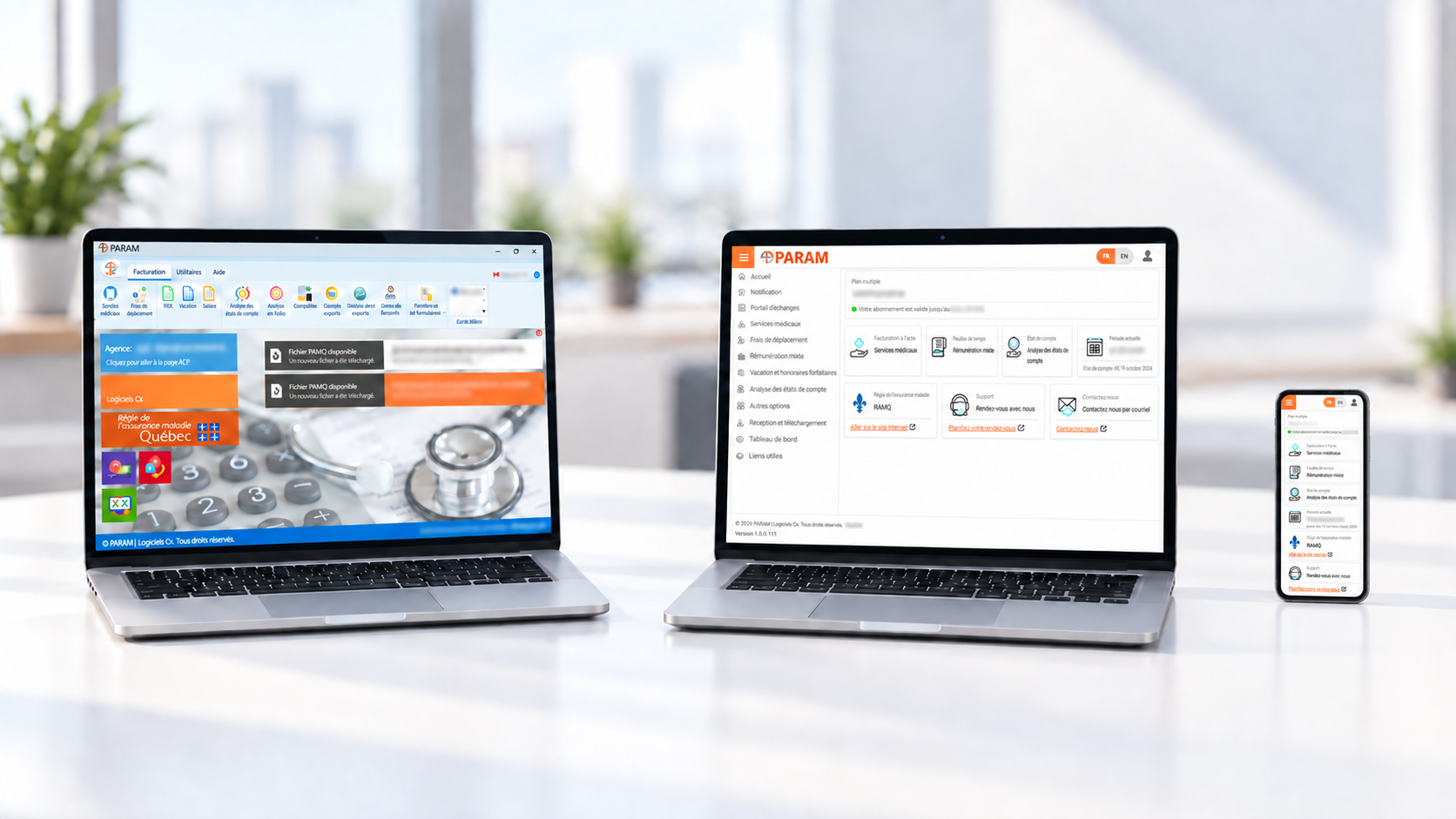
PARAM on Windows
Use the PARAM application installed on your Windows computer. A familiar way to work for those who prefer a desktop application.
Go to downloadsPARAM Web
Access PARAM through your browser on Mac or PC. Choose this environment or combine it with the Windows application.
Windows and Web, as you need them.
Use Windows, the Web or both. We help you set them up for your billing.
The remuneration modes your practice needs.
All four remuneration modes are available on Windows and the Web for family physicians and specialists.
Fee-for-service billing
Medical services and travel expense billing.
Mixed remuneration (rémunération mixte)
Timesheets and mixed remuneration: the electronic equivalent of Form 3743.
Hourly rates, lump-sum fees and vacation
Vacation remuneration and lump-sum fees: the electronic equivalent of Form 1215.
Fixed fees and salaried remuneration
Fixed-fee and salaried remuneration: the electronic equivalent of Form 1216.
Fee-for-service billing, from claims to follow-up.
Find the tools to prepare your claims and manage them after submission.
Medical services
Enter covered medical services provided for in the Agreement.
Travel expenses
Bill travel expenses related to covered services under the Agreement.
Statements of fees and reimbursement
Prepare the statement of fees associated with a reimbursement request for services provided to an insured person.
Modification requests
Modify submitted information and add or remove claim lines.
Cancellation requests
Request cancellation of a claim containing an error.
Rectified claims
Retrieve claims corrected by the RAMQ.
Tools to enter and check your claims.
Shortcuts, templates and validation support your day-to-day billing.
Templates, copies and shortcuts
Custom templates for recurring activities, specialty templates, copying services or claims, keyboard shortcuts and code shortcuts.
Validation as you enter data
Check basic information, flag errors and highlight required details. Rules can also suggest or add codes and context elements based on the entered data.
Code suggestions
Based on your entries, PARAM suggests billing codes, diagnoses, context elements or referring professionals to assist your work.
Recurring information and directory
Access the CMQ professional directory and useful entry information, including the last diagnosis and hospitalization or event dates.
Import your billing files.
Prepare invoices from files and get help understanding RAMQ messages.
Excel, TXT and RAD import
The import wizard prepares claims from files. It is particularly useful for biochemistry, diagnostic radiology, radiation oncology and nuclear medicine.
PDF document recognition — optional
Import documents from your EMR or service lists. Recognition and data extraction help prepare your claims. This service is available at an additional cost.
Analysis of explanatory messages
AI assistance helps explore RAMQ explanatory messages and review the context of your billing.
Batch claim submission
Submit a batch of entered claims and view the RAMQ acceptance results. Pending claims can be submitted when the service is available.
Claim entry during RAMQ maintenance
On Windows and the Web, you can prepare claims during RAMQ maintenance and submit them when its services are available again.
Track your billing and payments.
Detailed information to view your history, understand results and track your activity.
Account statement analysis and reconciliation
View statements and reconcile them with your billing to track payments and items to review.
History and demographic records
Access service and billing history, along with patient demographic information needed for your claims.
Detailed and summary reports
Billing documents, account statements and financial statements: view reports, download them or email them to physicians.
Caps and statistics
Track accumulated activity and practice earnings against semi-annual or annual caps. Projections help you anticipate reaching them.
Services and resources that support you.
Beyond claim entry, find additional RAMQ tools and ways to get help.
Additional free RAMQ services
Register patients with a family physician, identify a patient’s family physician and verify eligibility.
RAMQ notifications and news
Find reminders, updates, newsletters and maintenance notices relevant to your billing.
Help, training and appointments
User guide, interactive guides, FAQ, online appointment booking and personalized training. Our team supports your first billing submissions and provides help by phone, email and remote connection.
Benefits throughout your career
Starting your practice, referrals, retirement or a change in circumstances: explore the benefits for Logiciels Cx clients.
Need help choosing?
Tell us how you handle billing. We will show you the features relevant to your practice.
Your registration and setup.
We prepare your billing agency setup with you. You can start with a one-month free trial; the software change with the RAMQ is confirmed when you choose to continue with PARAM.
Support from the start.
Setup, training and your first billing submissions: our team helps you get started.
Who is PARAM for?
For physicians who handle their own billing, administrative teams and billing agencies.

Physicians
Family physicians and specialists who manage their own billing.
Benefits throughout your career
Groups and clinics
Groups of professionals and administrative teams that manage billing for several physicians.
Explore multi-physician plans
Billing agencies and staff
Use PARAM to handle billing for your physicians. You can also give them access to the platform to view their documents and billing.